

Inbound Calling
Customers can call the business number you publish. Answer on the platform when that number is voice-capable.
Review number capabilityTextTorrent voice calling keeps business phone calls next to the texts, contacts, and numbers your team already uses. Place outbound calls from the dialer, answer inbound calls on a voice-capable business number, and review what happened in call logs. When a conversation should continue in writing, send an SMS from the same connected-call view.
SMS is fast for updates and follow-up. Quotes, objections, scheduling, and service issues often still need a live voice conversation on a number customers recognize.

People reply to a message by calling the same business number. Voice-capable numbers can receive that call instead of sending it nowhere.

A dialer lets a teammate call a contact directly when a text thread needs a real-time answer.

Personal mobiles hide who called, who answered, and whether a recording exists. Call logs keep that activity with the business account.

After the call, the same workspace can send a confirmation, link, or follow-up message to the person you just spoke with.
Use a voice-capable TextTorrent number for the calls you place and the calls customers make to that number.
Confirm the business number lists voice capability before you publish it or use it for calling.
Start an outbound call from the dialer, or answer an inbound call to that business number.
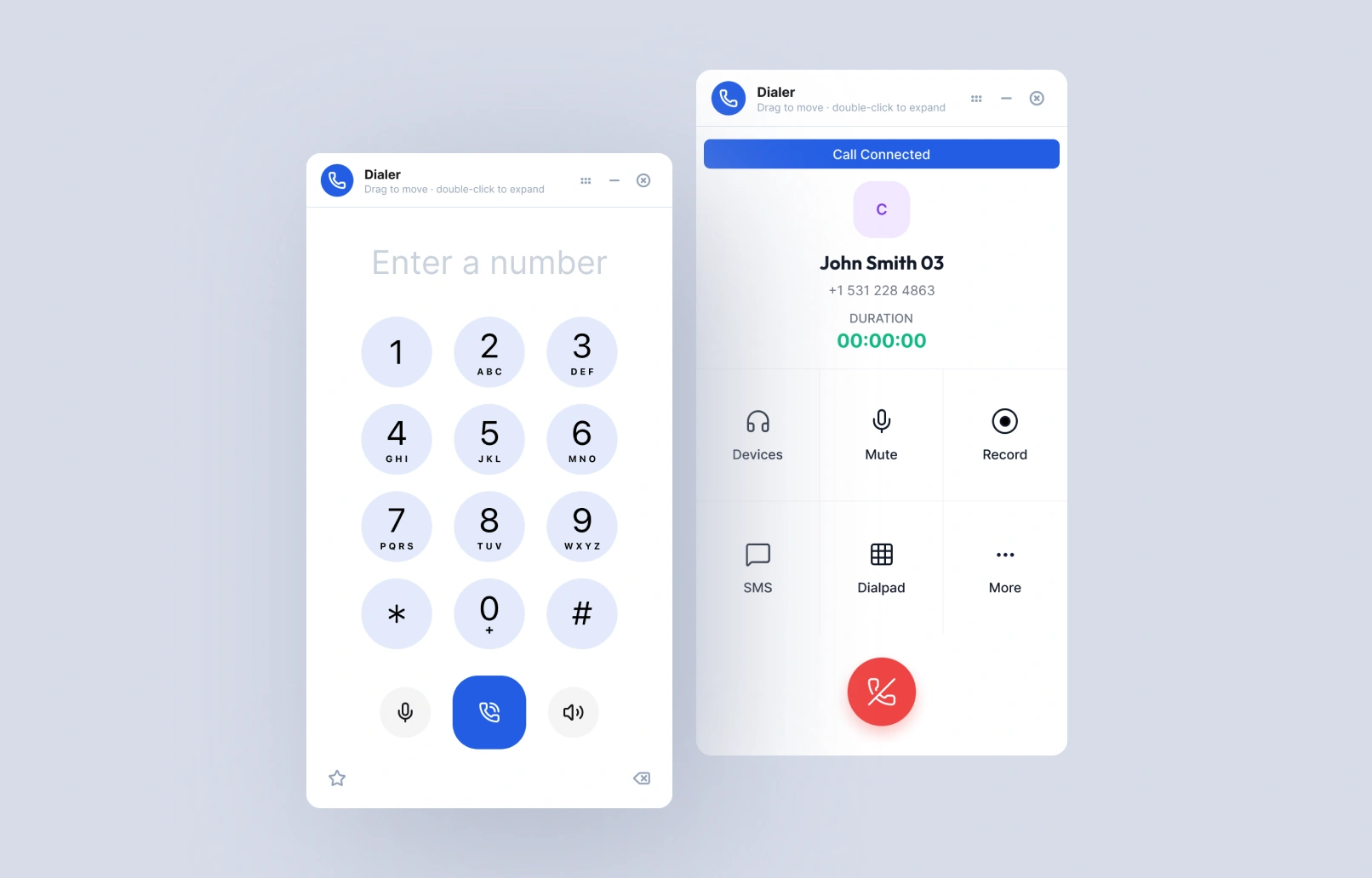
On a connected call, use the in-call controls for devices, mute, recording, the dialpad, and SMS.
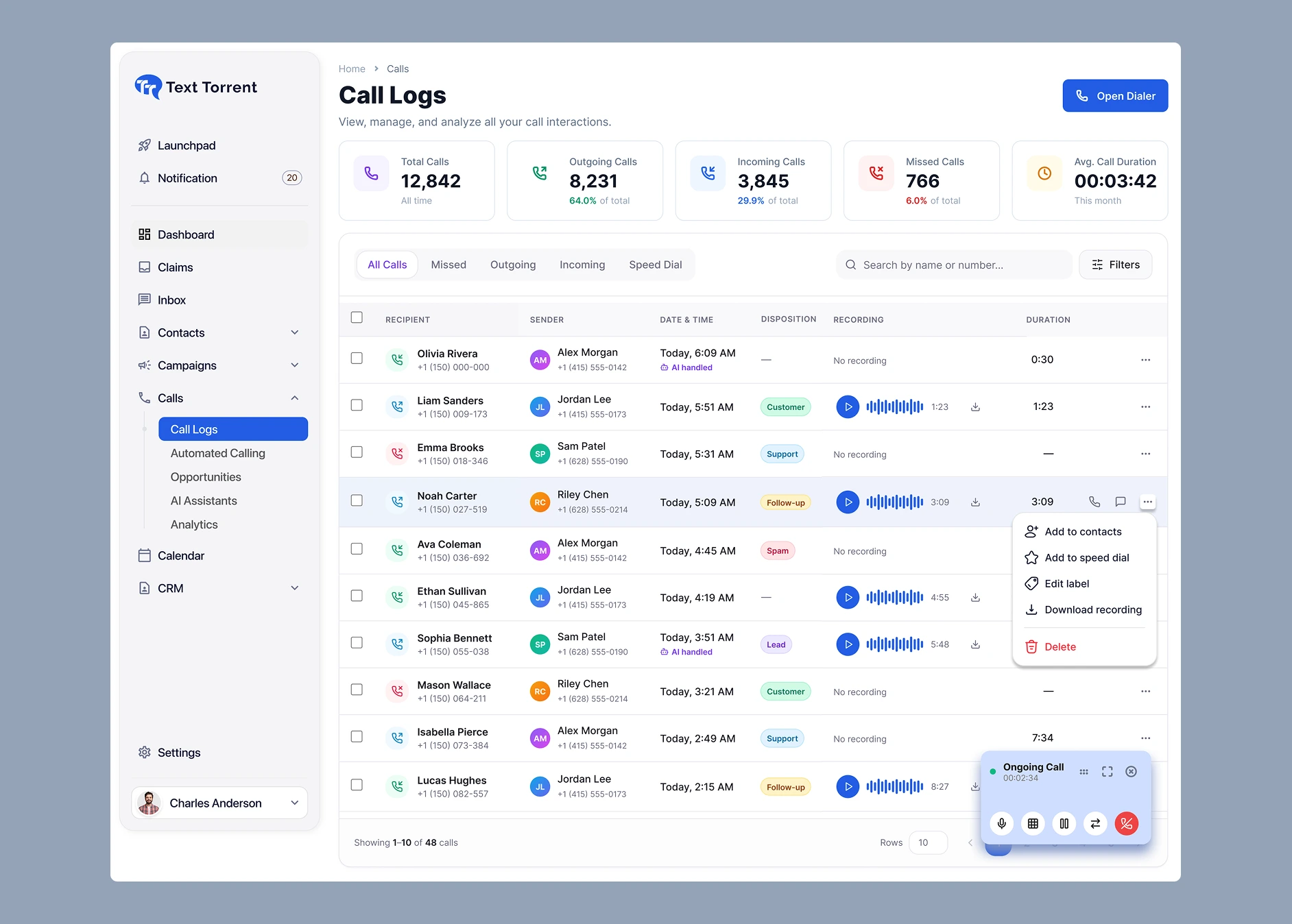
The call appears in call logs with direction, timing, duration, disposition, and a recording when one was saved.
Send a text from the call view or the inbox so the written follow-up stays on the same business number.
TextTorrent does not provide emergency calling. Do not use voice calling to contact 911 or other emergency services.
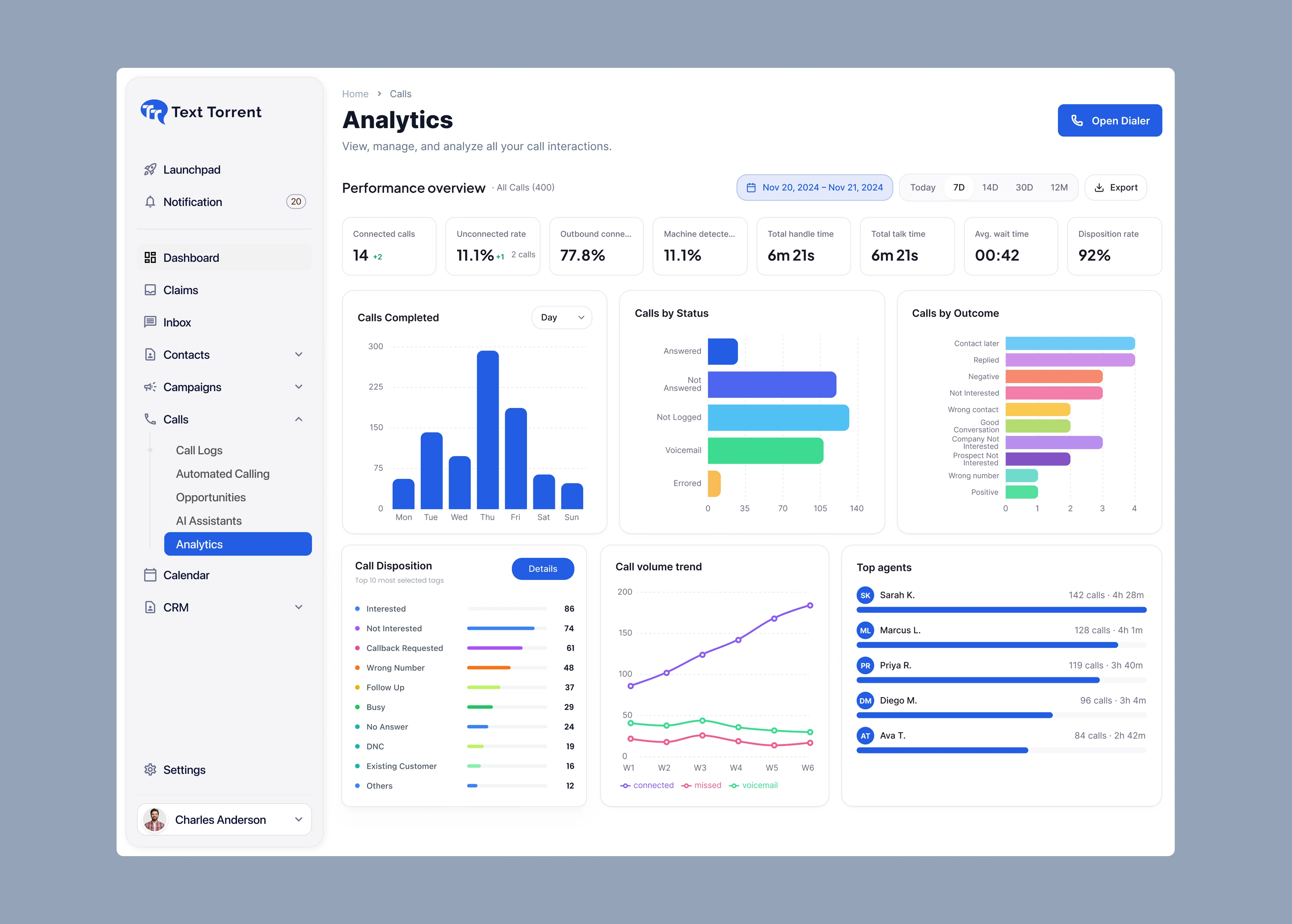
Call analytics turns call logs into a performance view. Filter the date range, compare connection and outcomes, and see which teammates are handling the volume.
Charts on this page use demonstration data. Call analytics summarizes calling activity and is separate from SMS campaign analytics.
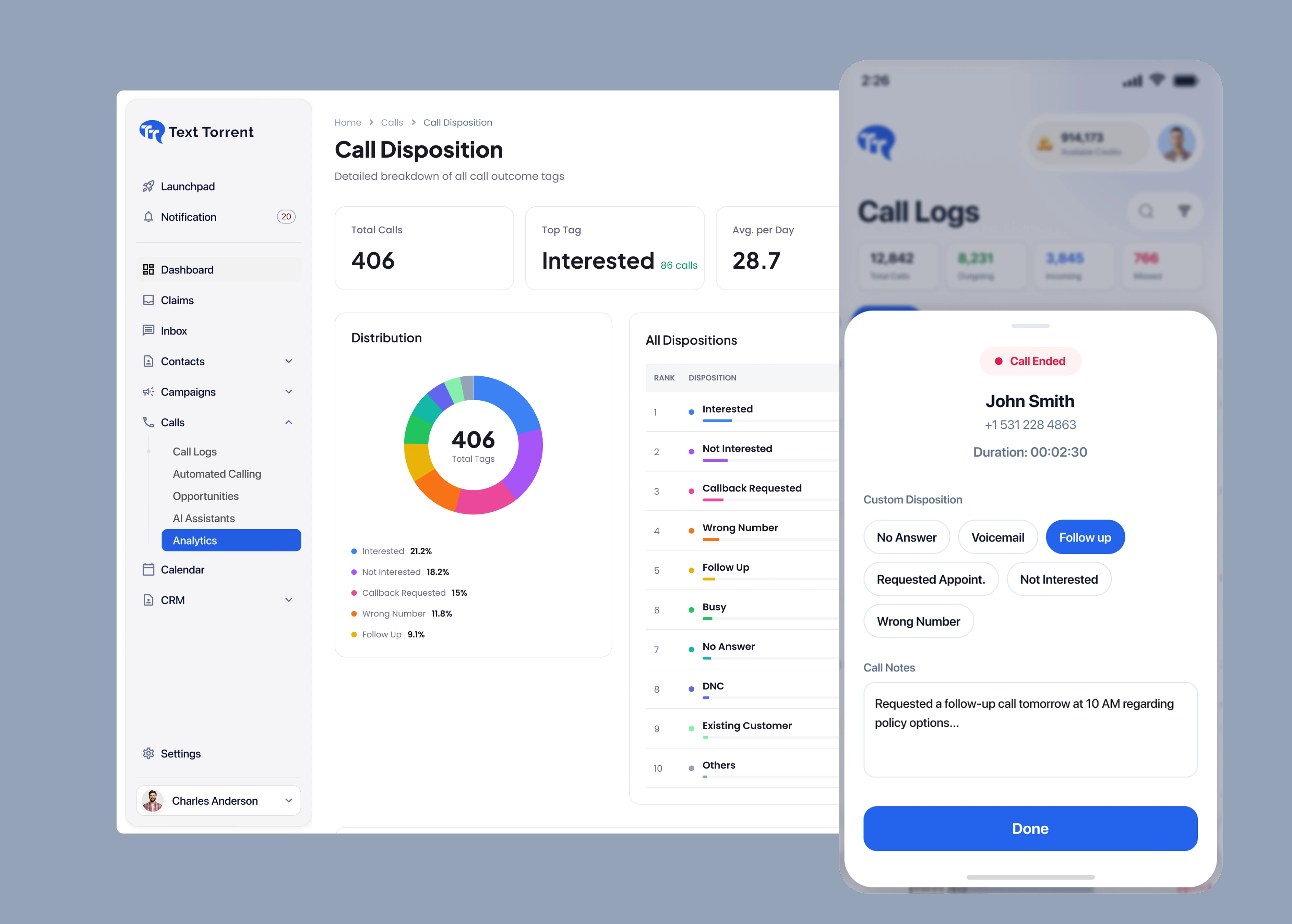
A disposition is the outcome tag you save when a call ends. Those tags feed the call disposition breakdown so the team can see which results are most common.
Disposition tags describe the call result your team recorded. They are not legal proof of consent, and they do not update the SMS opt-out list by themselves.
The dialer is the outbound calling workspace. Enter the number you are authorized to call, connect, and handle the conversation without switching to a separate phone system.
Caller ID must identify a number and business identity you are authorized to use. Do not present a misleading or unauthorized number.
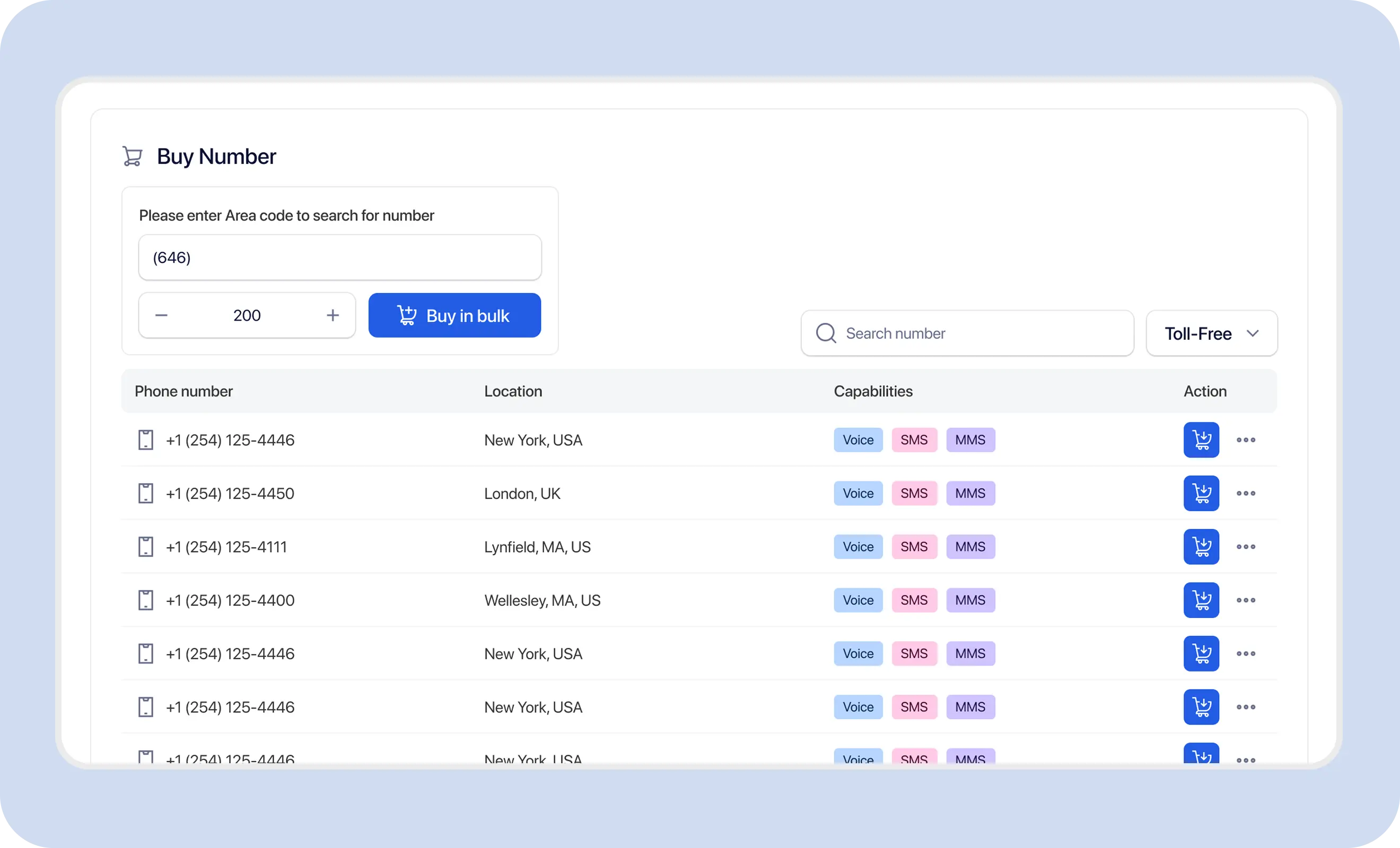
Voice, SMS, and MMS are separate capabilities. A number can support one, two, or all three. Check the capability list before you depend on calling.
A local area code does not prove a physical office in that city. Confirm capability on the specific number.
Beyond the dialer and call logs, TextTorrent voice services may include routing, voicemail, and team call-handling tools where those features are enabled for the account.
Customers can call the business number you publish. Answer on the platform when that number is voice-capable.
Review number capabilityCall a contact from the dialer when the conversation needs a live voice instead of another text.
Organize contacts firstMissed calls can go to voicemail where voicemail is enabled, so the team can review the message in the control panel.
See voicemail and forwardingForward calls, use simultaneous ring, queues, IVR, or schedules where those routing tools are available for the number.
Explore call forwardingConference calling, call whisper, monitoring, and barging may be available so a teammate can join or coach a live call.
See team workspacesCall logs keep direction, timing, duration, and disposition. Play or download a recording when one was saved for that call.
Review messaging analyticsVoice calling is part of the same business communication workspace as numbers, texts, contacts, and campaigns.
Send supported incoming calls to a mobile or office line when the right person is not at the TextTorrent dialer.
Explore business call forwardingContinue the conversation in writing after the call, using the same business number when it is SMS-capable.
Explore two-way textingTeammates can still handle text replies in the shared inbox while calls are logged in the calling workspace.
Explore the shared inboxKeep the phone numbers you call, and the people who call you, organized with the rest of the audience.
Explore contact managementUse messaging automation for approved text follow-up while live calls stay a separate, intentional action.
Explore SMS automation10DLC registration covers application-to-person texting. Complete it for SMS, and treat calling consent as its own requirement.
Explore A2P 10DLC supportThese are practical call-and-text workflows. They do not replace consent, Do Not Call screening, or recording rules.
Check consent and Do Not Call obligations before the call.
Explore Sales Follow-Up messagingTell customers when a call is recorded if notice or consent is required.
Explore Customer Support messagingUse only numbers and caller ID you are authorized to present.
Explore Real Estate messagingFollow the communication and privacy rules that apply to your practice.
Explore Appointments messagingVoice sits with the numbers, messages, and contacts the team already manages, instead of in a separate phone system.
Place a call, see duration, and use mute, recording, dialpad, and SMS controls from the calling workspace.
Incoming, outgoing, and missed calls stay in call logs the account can review later.

Choose numbers that show voice capability, and keep SMS on that number when messaging is also enabled.

Add forwarding, voicemail, or other available routing tools when calls should reach a specific person or queue.

Send the written follow-up from the same platform the call was handled in.
Use this page for the calling tools TextTorrent makes available. Availability can depend on the number, account, and enabled features.
TextTorrent provides the calling tools. Your business remains responsible for who you call, the caller ID you present, recording notice, and the content of the call.
TextTorrent is a technology platform, not a law firm. Customers are responsible for consent, Do Not Call screening, caller ID accuracy, call recording rules, data protection, and compliance with applicable laws, carrier requirements, and the terms of their account.
Straight answers about placing calls, receiving calls, and keeping voice next to SMS in TextTorrent.
TextTorrent voice calling is the set of business calling tools in the platform, including inbound and outbound calls, a click-to-call dialer, call logs, and related voicemail and routing features where they are enabled. Calls stay with the same account you use for business texting.
Yes. Use the dialer to enter a number and place an outbound call from a voice-capable TextTorrent number. You are responsible for having permission to call that person and for the caller ID you present.
Yes, when that number is voice-capable. Inbound calls can be answered in TextTorrent, sent to voicemail, or forwarded to another destination where those options are configured.
No. Voice, SMS, and MMS are listed separately when you search or manage numbers. Confirm the Voice capability on the specific number before you advertise it for calls.
Yes. The connected-call view includes an SMS action, and the number can also be used for two-way texting when it is SMS-capable. Messaging consent is still required for the texts you send.
Open Call Logs to filter incoming, outgoing, and missed calls. Each row can show the parties, time, disposition, duration, and a recording when a recording was saved. Call Analytics summarizes that activity across a date range.
Call analytics shows a performance overview for your calls, including connected calls, unconnected rate, handle time, talk time, wait time, and disposition rate. You can also review calls by status, calls by outcome, call volume for connected, missed, and voicemail calls, and top agents. Filter by a preset or custom date range and export the view. It is separate from SMS campaign analytics.
A call disposition is the outcome tag saved when a call ends, such as Interested, Not Interested, Callback Requested, Follow Up, Voicemail, No Answer, or Wrong Number. You can add a call note with the tag. The disposition view then shows how those tags are distributed and which tag is most common.
Voice calling is the broader product: you place and receive calls in TextTorrent. Call forwarding is the routing option that sends an incoming call to another phone number. Use forwarding when the person who should answer is on a mobile or office line.
A recording control is available on a connected call, and call logs can store a recording when one was created. You must provide any notice and obtain any consent required before recording, monitoring, whispering, or barging into a call.
No. TextTorrent voice services are not an emergency calling system and must not be used to reach 911 or other emergency services.
No. A2P 10DLC is for application-to-person business texting on US local numbers. Phone calls have separate consent, Do Not Call, caller ID, and recording requirements. Complete 10DLC for SMS, and handle calling compliance on its own.


